


How to start/use GreenChord
STEP 1 ID linking and consent
Downlaod POSRI
Please download POSRI app
[OS:iOS 15.6 + , Android 8.0 +
After download, please agree on the terms of service, input sex and birthdate.


Email address registration and ID linking
❶ Move "Home"
When prompted to register an account, tap "Register".

❷ You will now set your email address and password.
Please register an email address that you can check immediately. Please set your own password. *This is different from your Green Chord password.

❸ A 4-digit verification code will be sent to the email address you registered. Please enter this code into POSRI to complete the verification process.
—Regarding Password Settings—
Please use uppercase and lowercase letters and numbers, and set a password of 8 characters or more.
Symbols are also allowed.
❹ Once account registration (authentication) is complete, you will see a message asking "Do you have a test ID?". Tap "Link Test ID" to proceed to the ID/code linking screen. Please enter the ID and initial password listed in the "ID and Initial Password Information" document. You can also scan the QR code.


What if I closed the pop-up?
Tapping "Health Navi" at the bottom of the screen will take you to a screen like the one shown on the right. Tapping "Service ID & code linking" at the top of the screen will take you to the account registration screen, so please follow the same procedure to complete the setup.

Proceed to Green Chord genetic testing
Tap "Start Pre-Consent" under "Genetic Testing." Alternatively, as shown in the diagram, go to "Health Navi" from the bottom of the screen and tap Green Chord Genetic Test.


Please tap "Green Chord test consent
test consent
Please follow the instructions on the app screen to give your consent. If you do not consent, please return this test kit to the medical institution.
Please select the items for consent
Let's understand the test. Please watch the video or read the explanatory document.
Please review the consent form and tap "Agree" or "Disagree." If you agree, please sign your name.
(If instructed by a medical institution) Please return to the reception desk.
Once above consent has been done, please return to the reception desk and show the screen to a staff member. *Those who selected "Do not consent" should also show the screen to a staff member and return the test kit.

STEP 2 Sample collection and mailing
Preparation
Please brush your teeth at least one hour before collecting your saliva sample.
Using toothpaste or mouthwash is recommended.
Please refrain from eating, drinking, or smoking for at least one hour before collection.
Food, drinks, or chemicals (medications, barium, etc.) remaining in your mouth may affect the test results.
Sample collection


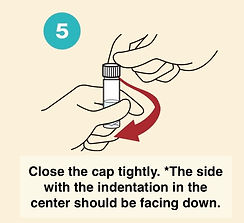
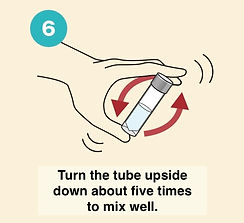
Mailing
Place the tubes containing the saliva and preservation solution into a clear plastic bag and seal it tightly. Then place it in an envelope and drop it off at your nearest post office or mailbox. Shipping is free.

STEP 3 Online counselling
Green Chord uses the POSRI app for online consultations and results reporting. Those scheduled for consultations at a medical institution should follow the instructions of their institution.
You will receive an email
Once your test results are available, you will receive an email with instructions on how to schedule an interview. Please schedule your online interview after receiving the email.

How to make a reservation
❶ Open the POSRI app and tap the "Online interview reservation" icon. If it doesn't appear, go to "Health Navi" at the bottom of the screen and tap "Green Chord Genetic Test."

❷ Tap "Answer the medical history questionnaire (optional)." Answer the questions regarding your medical history & current illnesses, family history, and other medical questions.

Please select any illnesses you have had in the past or are currently being treated for.

Please select any illnesses your family members have had in the past or are currently being treated for.

We will ask you about your lifestyle habits regarding smoking, exercise, alcohol consumption, and sleep.
❸ Next, tap "Register health checkup results (optional)". * Please register your most recent health checkup results to the best of your knowledge. You can also register with a photo. * Once completed, tap "Register".

❹ Next, tap "Disease Risk Prediction AI" and Let's look at the risk prediction based on the medical questionnaire and health checkup results. * Genetic test results are not used for prediction. * Details about the Disease Risk Prediction AI are provided in the next section.

❺ Next, tap "Learn more about Genetic testing (optional)"
Let's learn about genetic testing.
• This is a video of about 6 minutes. Please play it.
• When you're finished watching, close the screen using the arrow in the upper left corner.

❻ Finally, tap "Online interview reservation and confirmation."
.png)


Please select a person to interview. *In some cases, selecting a person to interview may not be necessary. (This varies depending on the medical institution.)
Move the screen up, down, left, or right to select a date and time. A circle (○) indicates that a reservation is available. We will register your reservation after confirmation.
Interview schedule information is displayed at the top of the home screen. You can view details by tapping the banner.
For those who have undergone the brief screening for familial hypercholesterolemia and hereditary breast, ovarian, pancreatic, and prostate cancer syndrome:
You will receive an email from @kodokodo.or.jp when your test results are available.
To view your test results, tap "Rare variants" on the "Diseases" page in the "Genetic Testing" section. If the screen shown on the right appears, please follow the instructions to schedule an appointment.

AI for disease risk predicting (optional)
Navigate to "Health Navi" from the bottom of the screen, and tap the Disease risk prediction AI.


Follow the instructions on the app screen to answer the questions.
* Agree to terms of use
* Update health examination results
* Answer questionnaire
* Register current health condition
* You can skip this step if your health checkup results or questionnaire results are already registered!
Those who have taken the Green Chord test can use the "Disease risk prediction AI."
We analyze Toshiba Group's medical big data to predict your risk of developing lifestyle-related diseases five years from now.
This prediction is calculated based on the health checkup results and questionnaire responses you registered when preparing for your online consultation, so please check them before your consultation.
* The "Disease risk prediction AI" does not use the results of genetic testing for its risk prediction.

Online counselling
❶ Open POSRI, and tap the "Online Interview" banner at the top of the screen
If you are joining from a computer, you can tap "Copy Google Meet link," copy the URL, and log in from your computer.
❷ Please tap the "Open Google Meet" URL 5 minutes before your scheduled appointment.
The screen will switch to the online meeting screen; please wait a moment until the meeting begins.
❸ We will verify your identity at the start of the interview.
We will verbally confirm your name and date of birth.

Frequent Answered Questions

.png)
.png)
.png)
STEP 4 Register your lifestyle habits with POSRI
Register your lifestyle habits
Based on your online interview, register the lifestyle habits you plan to work on in POSRI.
POSRI contains over 300 carefully selected lifestyle habits with a high level of evidence.
For example...
◯ Select lifestyle habits related to diseases you are concerned about based on the results of your genetic test.
◯ Select lifestyle habits related to diseases you are concerned about based on the results of the disease risk prediction AI.
◯ Select recommended lifestyle habits from "Find Lifestyle Habits".
◯ Search for and register lifestyle habits you want to incorporate using keywords or categories.
Record your lifestyle habits
❶ Once you've registered a few of your lifestyle habits, start recording them every day.

❷ Recording your progress will accumulate POSRI time. It calculates your efforts in terms of time, showing "how much time you have increased before the onset of the illness."
❸ Once you mark it as a "Habit established" time will be automatically accumulated.
